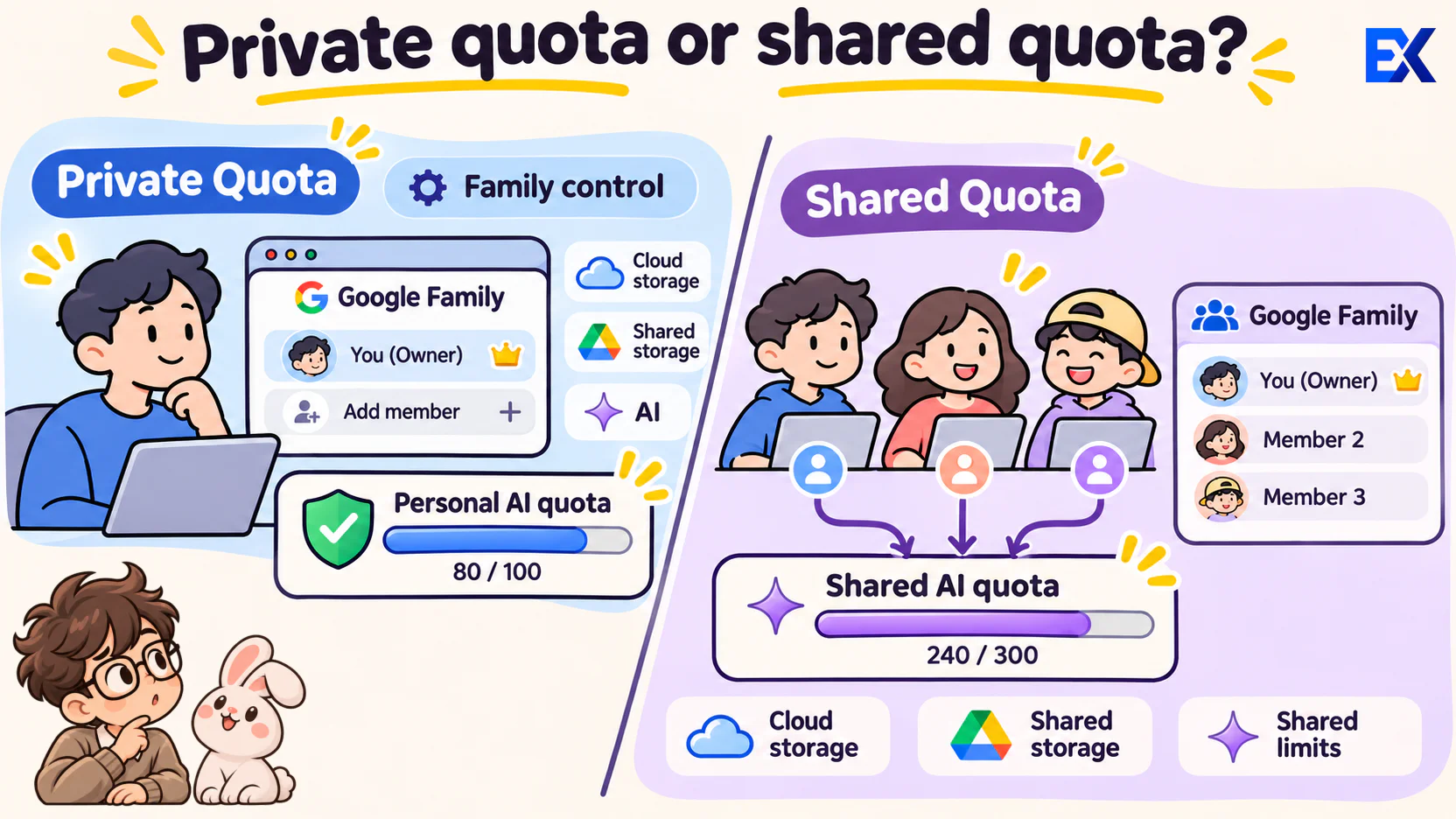
Quick answer:Shared Quota means joining an existing Family group. Private Quota means managing your own Family and choosing whether to invite other members. Both remain subject to Google's Antigravity usage limits. Private Quota is not a higher AI tier or unlimited access.
Choose Private Quota when you use coding agents regularly and want to control who shares your Family-level resources. Choose Shared Quota for lighter workloads and a lower-cost arrangement. These are EmpireX delivery options, not two separate official Google subscription tiers.
1. Why Private Quota matters most
When you code with AI every day, an unpredictable shared allowance can interrupt your workflow. Antigravity Pro Private Quota from EmpireX lets you manage your own Family instead of joining a pre-assigned group with five other members. Without additional invited members, you do not share Family-level allowances with strangers placed in the group by the seller. If you invite others, eligible benefits are shared. This means greater control, not unlimited AI usage.
2. Private Quota vs Shared Quota
Antigravity Pro en 1
Shared Quota: Your Google account joins an existing Family. Family-level entitlements, including shared AI allowances, may be affected by other members' activity. You do not choose who else belongs to that group.
Private Quota: You manage your own Family instead of joining a pre-assigned group. If you invite no one, you do not share its Family-level allowance with strangers added by the seller. You may invite up to five more members, subject to Google eligibility; applicable shared benefits will then be consumed together.
Feature
Shared Quota
Private Quota
Arrangement
Existing Family group
You manage the Family
Shared allowance
Used by Family members
Used by you and your invitees
Member management
No direct control
Invite up to five more
Independence
Depends on group activity
More control without invitees
Antigravity and Gemini
Eligible Google AI Pro benefits
Same eligible benefits
5TB storage
Family plan pool
Family plan pool
Flow credits
Plan-level, potentially shared
Plan-level; shared with invitees
Google limits
Still apply
Still apply
Key distinction: Private Quota is a Family-management arrangement, not a stronger AI tier, a promise of a fully unused allowance or unlimited access.
3. How the Antigravity quota really works
Antigravity Pro en 2
Google AI Pro offers a higher Antigravity baseline than free accounts. Google documents a five-hour refresh cycle until the weekly cap is reached. Actual usage depends on the model, number of agent steps and computing work; a fixed number of prompts cannot be guaranteed. Private Quota does not bypass the five-hour or weekly limits. Monitor Usage in Antigravity to plan complex jobs.
4. Beyond coding: the Google AI Pro ecosystem
Antigravity Pro en 3
The Google AI Pro 5TB offering includes eligible access to Google Antigravity for repository analysis, debugging, refactoring, testing and multi-step AI coding. Supported benefits also include Gemini, Deep Research, Google productivity AI, Flow and Google One 5TB. The 5TB storage pool belongs to the Family plan, rather than to each individual member. The 1,000 monthly Flow credits are likewise at plan level and shared when Family sharing applies.
5. Shared benefits and important differences
What both include: Subject to eligibility, both options provide Google AI Pro benefits such as Antigravity for AI coding, Gemini, Deep Research, Flow and Google One 5TB. Actual AI usage depends on Google's policies, the model and the workload.
What control changes: With Shared Quota, other Family members' use may affect shared limits. With Private Quota, you decide who joins your Family, offering more control over its shared allowances.
Storage and Flow: 5TB is a Family-plan storage pool, not 5TB for each member. Eligible Flow credits are also allocated at plan level and may be consumed jointly when you share your Family.
Privacy: Family membership does not automatically let other members read your private emails or files. You should still review file-sharing and account permissions.
Activation and warranty: Specific terms depend on the selected EmpireX option. Never send passwords or one-time verification codes in chat messages; follow the secure activation process.
Illustrative example (not a measured benchmark): Two Family members run long AI coding-agent jobs. If a resource is shared at Family level, heavier use by one member may reduce what remains for the other. Managing a Family without extra invitees removes pre-assigned group members from that equation, but Google's five-hour and weekly caps still apply.
Do not confuse three resources: (1) Antigravity Agent quota controls coding-agent usage; (2) Flow/AI credits follow their own consumption rules; (3) Google One storage covers files, email and photos. They are not interchangeable allowances.
6. Who should choose Private or Shared Quota?
Antigravity Pro en 4
Choose Private Quota when you regularly run agents, manage demanding coding projects, want control over Family members and prefer not to rely on a pre-assigned group's usage. Inviting others still means sharing eligible Family allowances.
Choose Shared Quota if your AI coding needs are occasional, you do not need Family management and you accept that other members may affect the shared allowance.
Neither arrangement guarantees a fixed number of prompts or overrides refresh cycles and weekly limits. Base your choice on membership control, sharing and your actual usage patterns rather than the name alone.
7. Choose your Antigravity Pro option on EmpireX
Antigravity Pro en 5
Visit the Antigravity Pro product page on EmpireX, review currently available Shared Quota and Private Quota options, and check activation and warranty terms before selecting one.
After activation, verify Google AI Pro benefits, Family status, Antigravity access and Google One storage. Private Quota offers more control over your Family arrangement, not unlimited Google AI usage.
8. Google Family eligibility: check before ordering
Review your Google account's Family eligibility before selecting an option. Google's rules include country eligibility (typically the same country as the Family manager), membership in only one Family at a time and potential 12-month restrictions on changing Family groups. Work or school-managed Google accounts may not qualify.
Already in another Family? Check the rules for leaving or switching groups before placing an order; do not leave an existing group without confirming the implications.
Planning to invite others? Private Quota gives you control over membership, but any benefits Google designates as Family-shared remain shared.
Concerned about privacy? Family membership does not automatically expose private mail or files. Review actual sharing permissions separately.
Worried about quotas? Check both the five-hour and weekly Antigravity usage indicators rather than assuming Family membership is the only limit.
9. Verify your benefits after activation
Check your Google One account for the activated plan benefits and available storage.
Review the Family membership list to confirm the promised Shared or Private arrangement.
Open Google Antigravity and its Usage view. Monitor both short-window and weekly limits.
If using Flow, check available AI credits and their renewal cycle. If something differs from your EmpireX order, contact support using your order number; never share a password or one-time verification code.
10. Frequently asked questions
Does Private Quota mean Antigravity can never run out?
No. Private Quota describes an EmpireX Family-management arrangement. Google still enforces refresh cycles, weekly caps and feature-specific restrictions.
Is my full quota guaranteed to return after five hours?
Not necessarily. Google's Antigravity docs describe a five-hour refresh until the weekly limit is reached. The actual amount of available use also depends on the model and workload.
Does each Family member get an independent 5TB?
No. For the EmpireX offering discussed here, 5TB is the plan-level shared storage pool, not a separate 5TB allocation for each person.
What if my account cannot join a Family?
Check your account's country, existing Family membership, last group switch and eligibility requirements. Contact EmpireX before purchasing a delivery option that may not be activated on your account.
Plan features and usage limits may change with Google's policies, the country and account eligibility. Verify the official docs and product terms at the time of purchase.