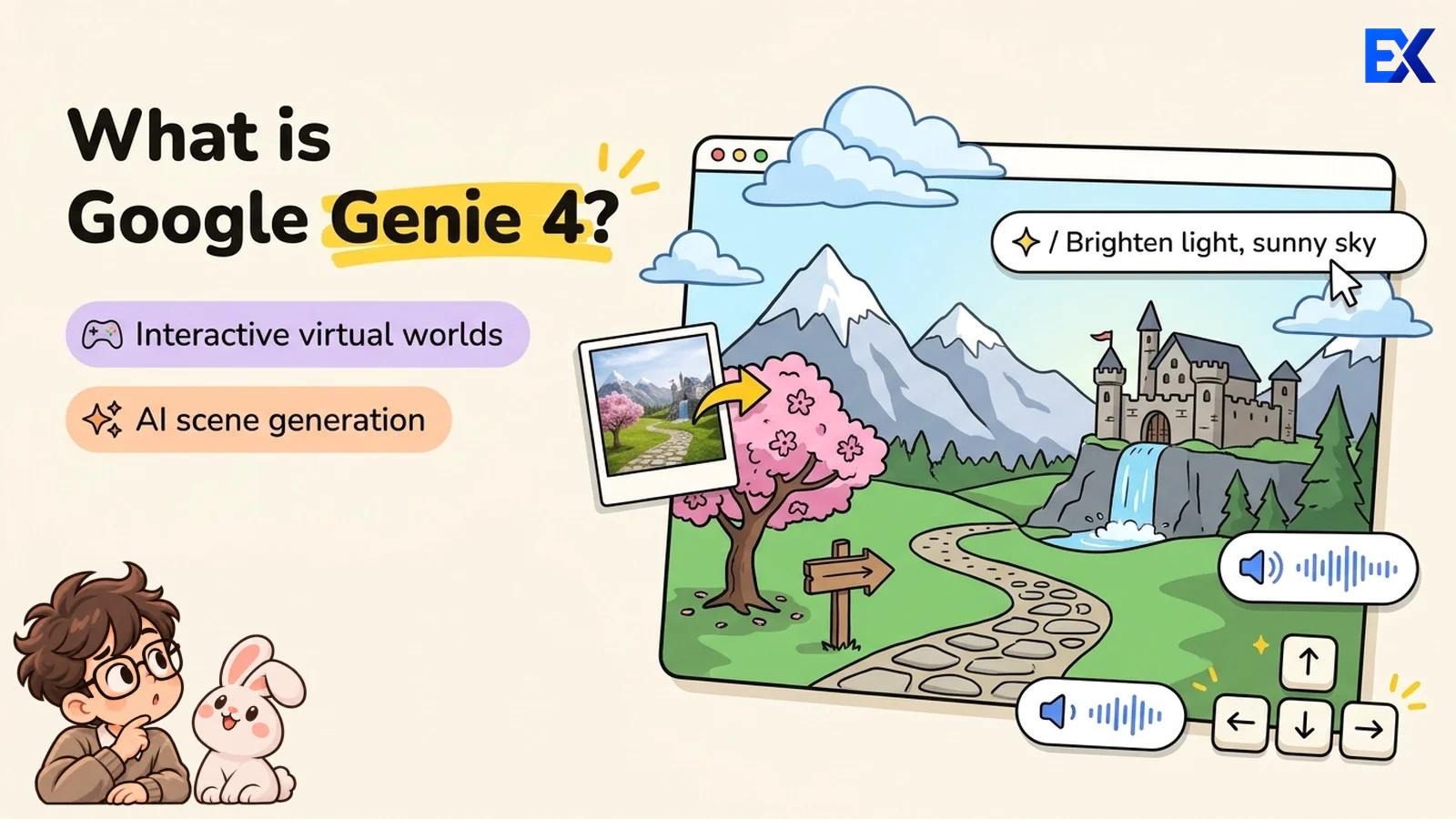
Google Genie 4 is a Google DeepMind world model that generates real-time interactive virtual environments from text, images and user actions. Rather than producing only a fixed video clip, it reacts as you explore a world and modify it with live prompts. Google announced the research on October 27, 2026, launched access for eligible Google AI Ultra users via Project Genie on November 18, and announced developer access through Gemini API and Google AI Studio on November 19. DeepMind launch · Project Genie update.
What is Google Genie 4?
A world model attempts to simulate how an environment responds to actions. With Genie 4 you can define a scene, use a reference image when supported, explore from a controllable camera perspective and prompt changes while moving. It is not the same as Gemini 4, the general-purpose model family, even though Genie 4 builds on Gemini capabilities.
Dimension
Genie 4
Conventional AI video workflow
Experience
Explore an interactive world
Watch a generated clip
Input
Scene, reference and live controls
Usually a prompt or image
Editing
Prompt changes within the active session
Often regenerate a sequence
Output
Real-time visuals with native audio
Pre-rendered video
Example
Interactive prototype or agent simulation
Storyboard or marketing clip
This is a workflow distinction, not a claim that every other video tool lacks interactivity.
Illustrative comparison: Google Genie 4 world model vs conventional AI video
What is new in Genie 4?
720p output at up to 24fps
The official model card describes real-time 720p video at up to 24 frames per second, with synchronized audio. Those are Google specifications rather than EmpireX-measured performance results.
Native audio and in-world dialogue
Ambient sound, effects and dialogue can evolve alongside the simulated scene. Audio accuracy is still a known research limitation.
Live prompting and a new creation agent
Project Genie users can change weather, lighting, objects or characters during a session. Google's Project Genie agent can help create an environment conversationally, and a community gallery enables exploration and remixing of eligible worlds. Google announcement.
Gemini integration
The model card describes Genie 4 as built on Gemini Omni Flash, with Gemini reasoning helping maintain a coherent world state. That does not guarantee perfect physics or object permanence.
Genie 4 vs Genie 3
Question
Genie 4
Updated Genie 3
Highest fidelity and native synchronized audio
Google's focus with Genie 4
Alternative available in the picker
Prompt-driven events
Yes
Yes
Longer sessions
Check the specific model limit
Up to 3 minutes per generation, per Google
360° panorama grounding
Verify supported features
Specifically announced
Best fit
More realistic audio-visual interaction
Longer runs and panorama starting points
The three-minute session figure refers to Genie 3, not automatically Genie 4. November 18 product update.
Illustrative comparison of Genie 4 vs updated Genie 3 in Project Genie
Who can access Genie 4?
Consumers: Google began rolling Genie 4 out to eligible Google AI Ultra subscribers in Project Genie. Google AI Pro users can join the waitlist; that does not mean general Pro access is active. Age, region and rollout conditions may apply. Visit Project Genie and inspect your account.
Developers: Google announced availability through Gemini API via the Interactions API and Google AI Studio on November 19, 2026. The company describes interactive 720p, 24fps worlds with native audio, keyboard control and text steering. Check up-to-date API access, quotas and pricing separately; an Ultra subscription is not an included API allowance. Developer announcement.
How to create an interactive world
1. Verify your eligibility
Sign into Project Genie using an eligible Google account. Check available models and options. Pro users may see a waitlist rather than direct access.
2. Write an actionable scene prompt
Specify place, lighting and time, camera or controlled character, and live events and audio. Use a reference image if your supported interface allows it. See Google's prompting guide.
Illustrative prompt, not a tested EmpireX result:
Create a coastal old town at sunset from a pedestrian's first-person perspective. Use quiet ocean waves, footsteps and wind. Keep streets spatially coherent while I walk toward the town square. When I type “start raining,” shift to overcast light and add rain sounds.
3. Preview, explore and refine
Inspect the world sketch, enter the simulation, use available controls, and issue simple changes such as adding fog or opening a storefront. Observe whether visual continuity and sound meet your expectations.
4. Review before sharing
Check object consistency, physical plausibility, audio, latency and respect for source-image rights. Share only suitable creations in the supported community gallery.
Illustrative 4-step workflow to create an interactive world in Project Genie
Practical applications
Game prototyping: explore environments, mood, camera movement and interactivity. Genie 4 does not automatically replace a full game engine or production pipeline.
Spatial design: visualize navigation and atmosphere, while avoiding the use of generated scenes as dimensionally accurate engineering plans.
Agent and robotics research: build diverse simulated experiences for evaluation, with the caveat that simulated performance may not transfer to physical environments.
Limitations and pricing
Google documents open challenges involving object permanence, spatial accuracy, complex physics, camera latency, text rendering, real-time audio accuracy and long-term continuity. Do not treat synthetic scenes as factual footage. Google states that generated video and audio in Project Genie contain SynthID watermarking and undergo safety checks. Model card · Project Genie.
Is Genie 4 free? No blanket free-access claim is justified. Project Genie rollout targets eligible Ultra accounts, with a Pro waitlist; API access and billing are separate. This article does not quote a fixed API price without validating the current Google pricing page.
EmpireX lists Google Ultra and Gemini AI Ultra. These listings do not guarantee access for every plan variant, country or account. Confirm the official eligibility first.
Frequently asked questions
Is Genie 4 the same as Gemini 4?
No. Genie is an interactive world model, while Gemini models serve broader AI tasks. Genie 4 incorporates Gemini technologies.
Can Genie 4 create a finished video game?
It can prototype interactive worlds, but does not automatically supply every required gameplay system, production asset, backend or QA process.
Is Genie 4 included with Google AI Pro?
Google announced access for eligible Ultra subscribers and a waitlist for Pro users, not universal Pro access.
Does Genie 4 generate video with sound?
Google states that it generates synchronized real-time 720p video at up to 24fps. Export features and session limits depend on the product surface.
Is there a Genie 4 API?
Google announced Gemini API access via Interactions API and Google AI Studio on November 19, 2026. Check the actual API entitlement and price for your project.
Conclusion
Google Genie 4 shifts generative AI from content you simply watch to simulated worlds you can explore and steer. It is promising for creative prototyping, interactive experiences and agent research—but still experimental, with practical access requirements and technical limitations. Start with short, well-specified scenes and verify outcomes.